|
|
|  | | |
S&F Prod. |
| | | |
| | | |
|
| | | |
| | | |
In your Bubble Bobble directory create the file BETA.DAT with the following text:
FDPnP
FAAaQ
FDDhOE
FAWNA
FAWaCk
FBXCP
Make sure every line ends with a newline character that Windows uses (CR+LF, 0x0D0A). This includes the sixth line. The first line enables cheat 1,
the second line enables cheat 2, etc.
- This cheat displays a number between 2 and 6 in the lower left corner of the screen. The lower the number, the more frames that are drawn.
In some levels the number of enemies is lower when the frame rate is also low.
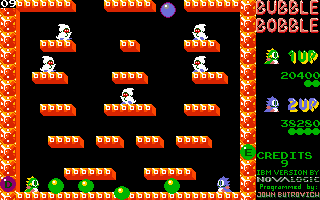
- This cheat displays in the upper right corner of the screen which special bubbles might appear in
the current level. The special bubbles are a water bubble, a fire bubble, a lightning bubble and bubbles with EXTEND letters. When an orange
E bubble is shown in the upper right corner of the screen it means that EXTEND letter bubbles might appear in this level. This does not mean
that only orange E bubbles appear.
- Press Alt+A to show the airflow and thus which way the bubbles float.
- When player 1 is hit and he makes somersaults press F7 for extra health
points for player 1. When player 2 is hit press F8 for extra health points for player 2.
- Press
j to go 10 levels back,
J to go 10 levels ahead,
m 1 level back,
M 1 level ahead.
You can use both Shift keys or the Caps Lock key on your keyboard to go from a lower case
j to an upper case J.
- This cheat has something to do with writing the file COREDUMP.BB, probably
when something goes wrong. I can't get the game to do something wrong, so I've never seen this COREDUMP.BB file. If you can make the game do
something wrong, contact us.
When there's a file named BETA.DAT in your Bubble Bobble directory, regardless of its contents, the setup section of this game will show a version number.
|
| |
|
|
| |
 |
| |